Neel led the UX/UI, interaction model, prototyping at low and high fidelity, and visual system.
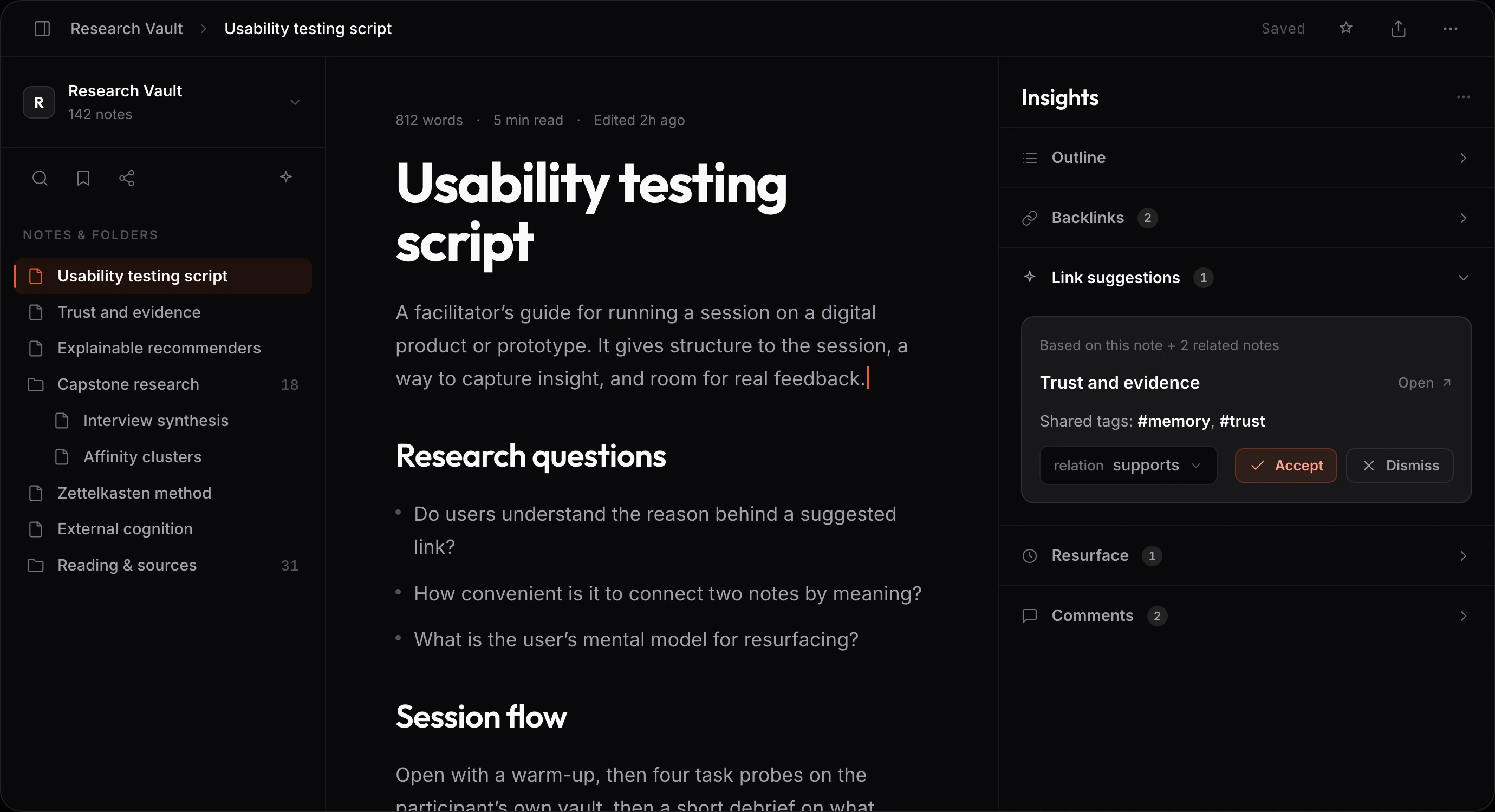
IMAGE UNAVAILABLETho8 workspace with three panes.
CASE 01University of Michigan HCDE capstone · research and product design
Tho8 / ZettelKraft: A thinking tool that shows its work
Across six contextual interviews, three graduate researchers and three knowledge workers described the same failure: an idea was captured, then lost during recall, linking, or reuse. Tho8 brings capture, connection, retrieval, and resurfacing into one workspace, with links based on meaning and visible reasons behind AI suggestions.
Ruhi partnered on research, ideation, evaluation, and testing. Neel led the product design, interaction system, and prototyping.
This capstone was completed and tested in two moderated rounds; it was not launched as a public product.
Ideas were being lost during retrieval, not capture
Capture often took one or two taps. The break came after the handoff into a personal vault, when title recall failed and search crossed a retrieval budget of roughly thirty seconds.
The cost was quiet but concrete: people rewrote work they knew they had already captured because they could not find or trust the path back to it.
- Knowledge workers using real note vaults and networked note tools.
- A finding became a requirement only when at least two of three research streams supported it.
- Link suggestions needed a visible reason, with evidence note chips available when transparency was enabled.
- The workspace had to remain navigable when graph complexity or AI output failed.
An ungrounded suggestion or lost note undermines trust in the entire knowledge workflow.
01 / Problem lifecycle
Where an idea disappears
The lifecycle maps the break from lightweight capture through connections that depend on titles, retrieval under a time limit, and the resurfacing gap before a product solution appears.
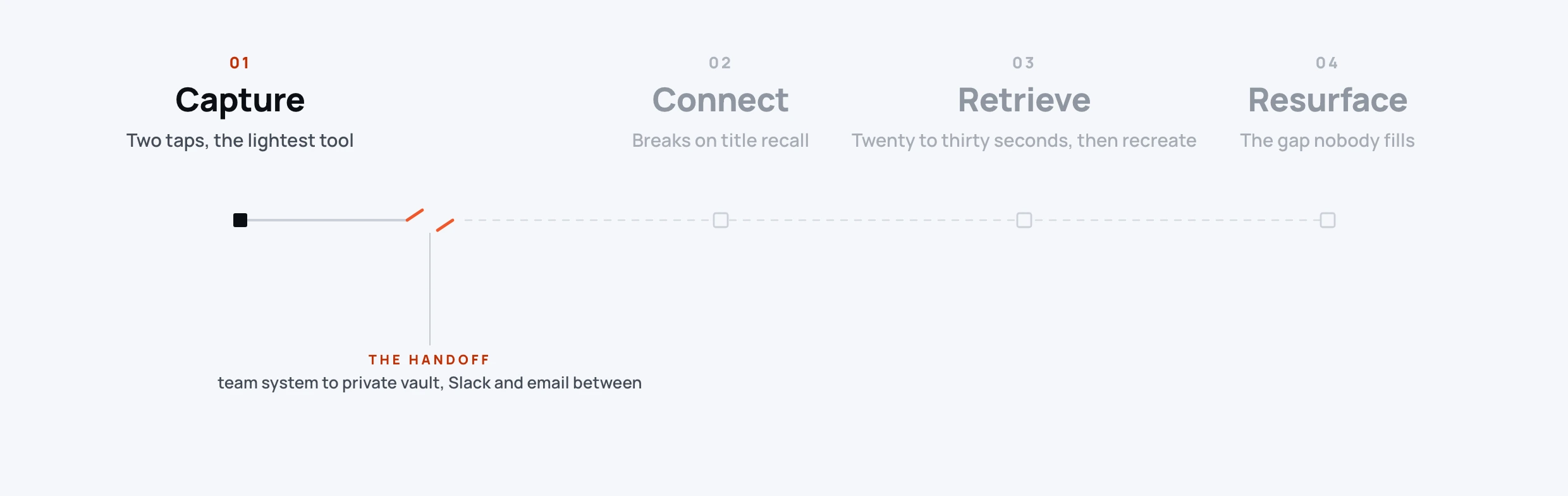
IMAGE UNAVAILABLEProblem lifecycle from capture through retrieval and loss.
Problem lifecycle
Capture stays light; connection breaks on title recall, retrieval expires, and resurfacing never begins.
Research had to precede the attractive solution
Six contextual interviews, six benchmarked tools, and a research rule requiring two of three sources shaped the requirements before interface assembly.
Three graduate researchers and three knowledge workers shared their screens to show real note setups and worked through four probes: relate, retrieve, judge trust, and explain a connection.
The interviews shaped the design direction alongside benchmarking and usability testing.Obsidian, Notion, Logseq, Tana, Mem, and Readwise were compared on capture, connection, retrieval, resurfacing, and trust.
Resurfacing at the right moment and showing proof behind a link were the clearest category gaps.Round 1 involved 4 or 5 participants. Round 2 involved six participants and compared the old and revised interface across four core tasks.
Neel translated the findings into design changes across save feedback, AI scope, graph focus, and recovery.Eight core screens mapped the complete sitemap with five branches and the transitions between capture, connection, retrieval, and resurfacing.
The sitemap kept each screen tied to one of the four core knowledge work loops.01 / Research record
Screening, comparison, and triangulation
A screener with nine questions, the benchmark of six tools, participant roster, trust ladder, and triangulation matrix keep each requirement traceable to more than one research stream.
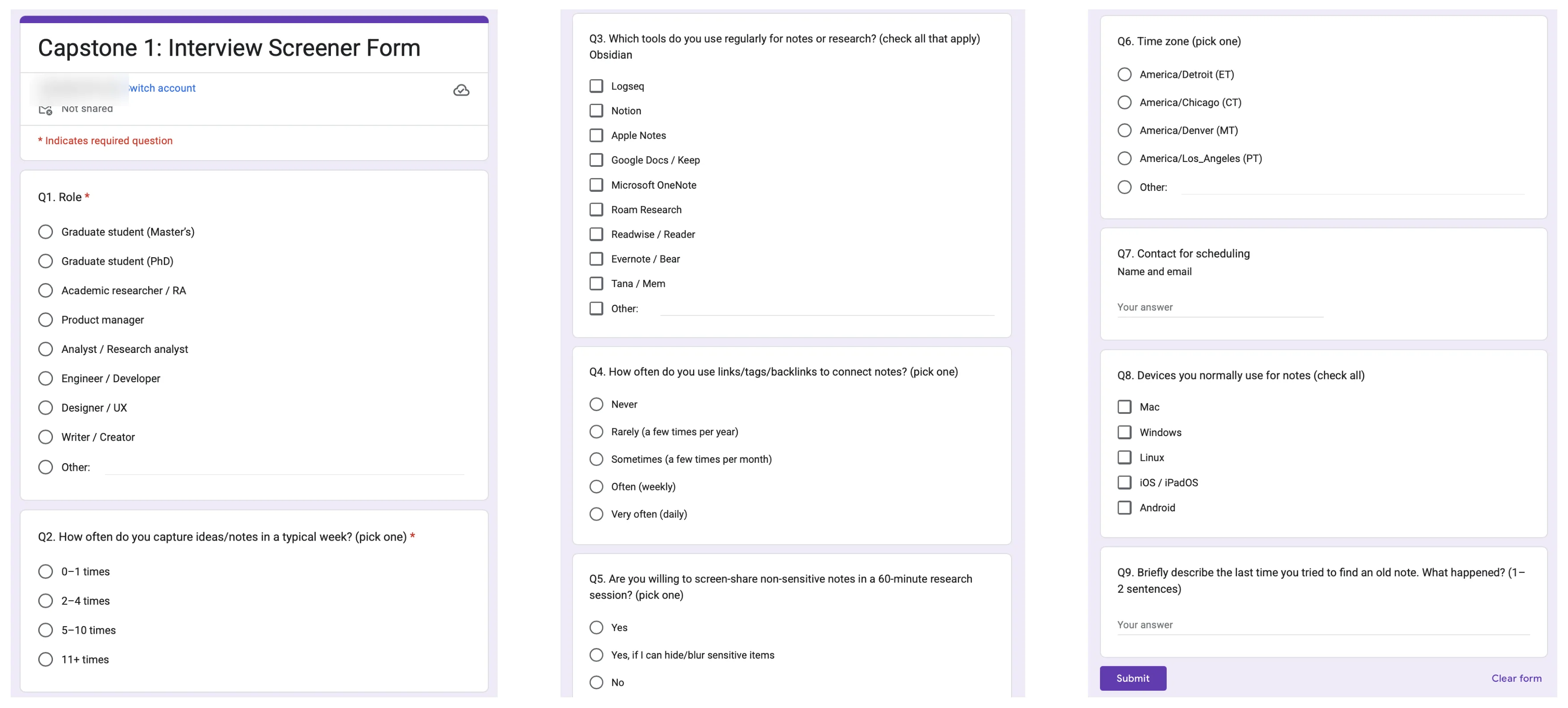
IMAGE UNAVAILABLEParticipant screener artifact.
Research record
Participant screener artifact.
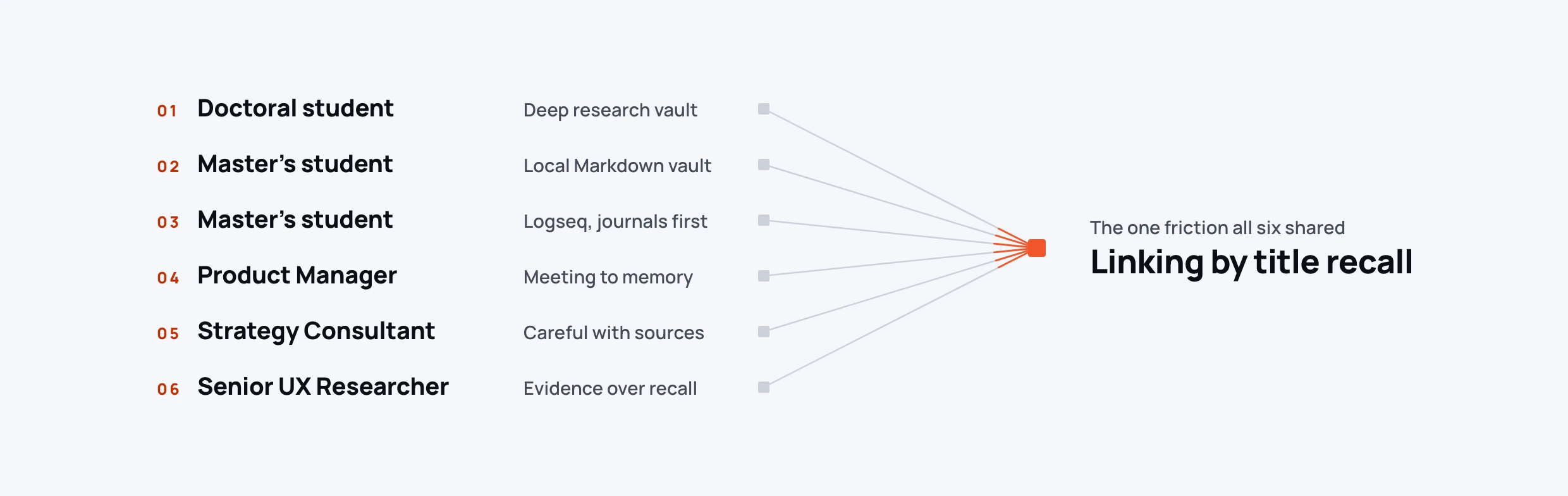
IMAGE UNAVAILABLEResearch participant roster artifact.
Research record
Research participant roster artifact.
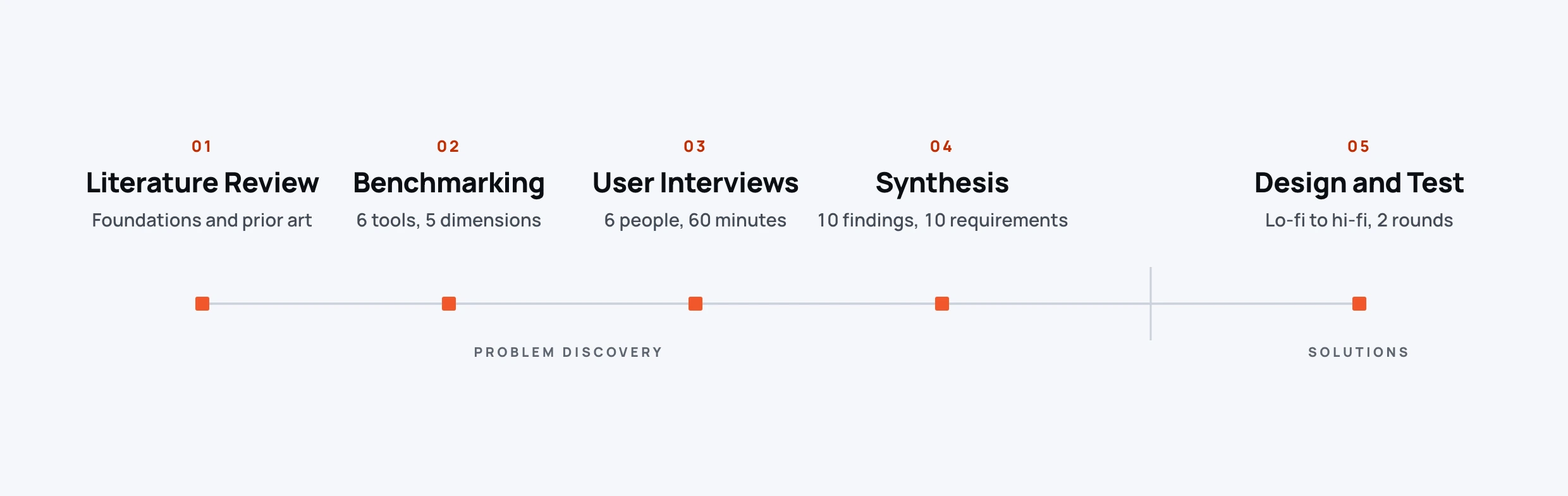
IMAGE UNAVAILABLEResearch method summary.
Research record
Research method summary.
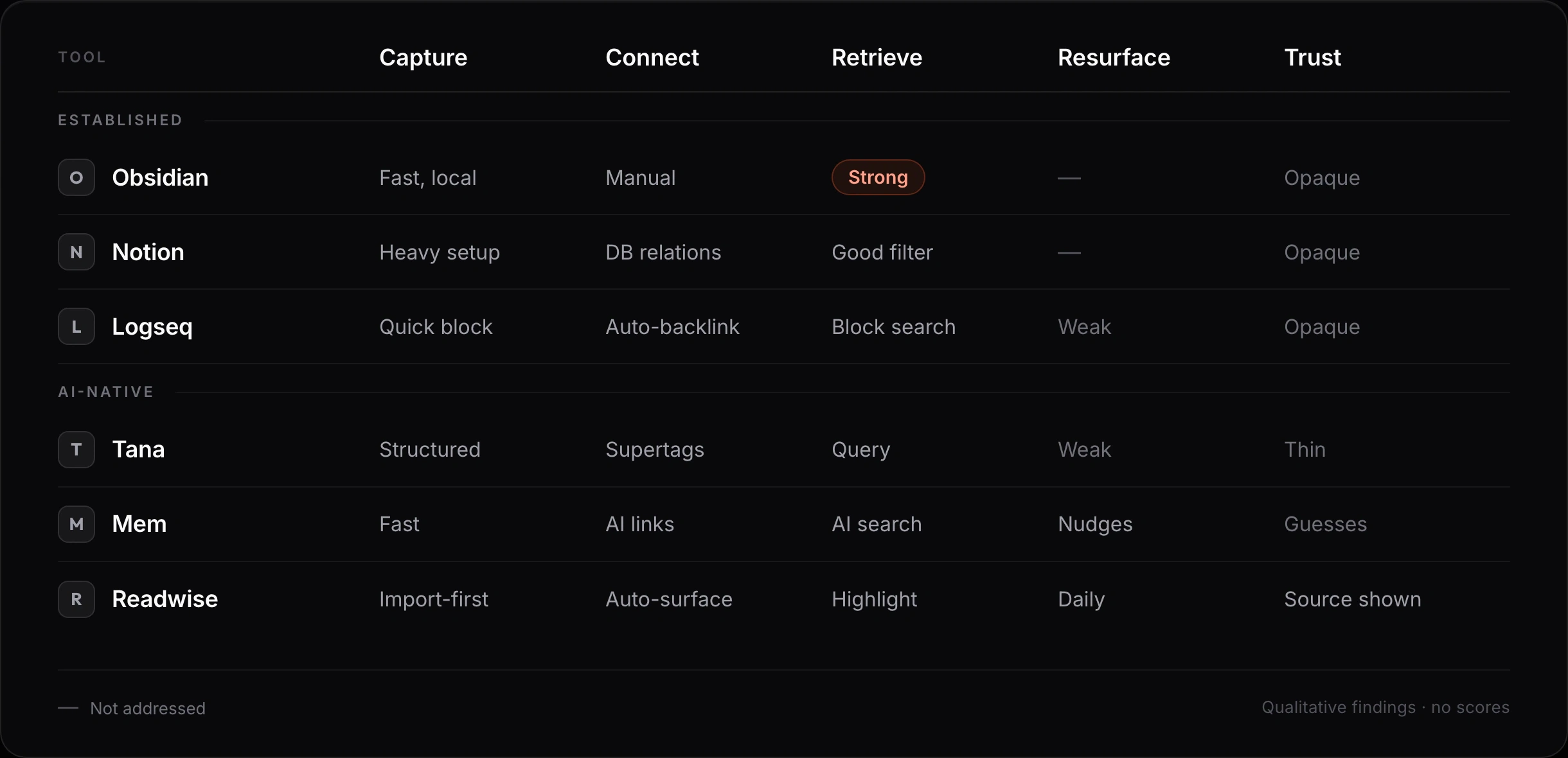
IMAGE UNAVAILABLEBenchmark of six tools across five dimensions.
Research record
Six named tools across capture, connection, retrieval, resurfacing, and trust.
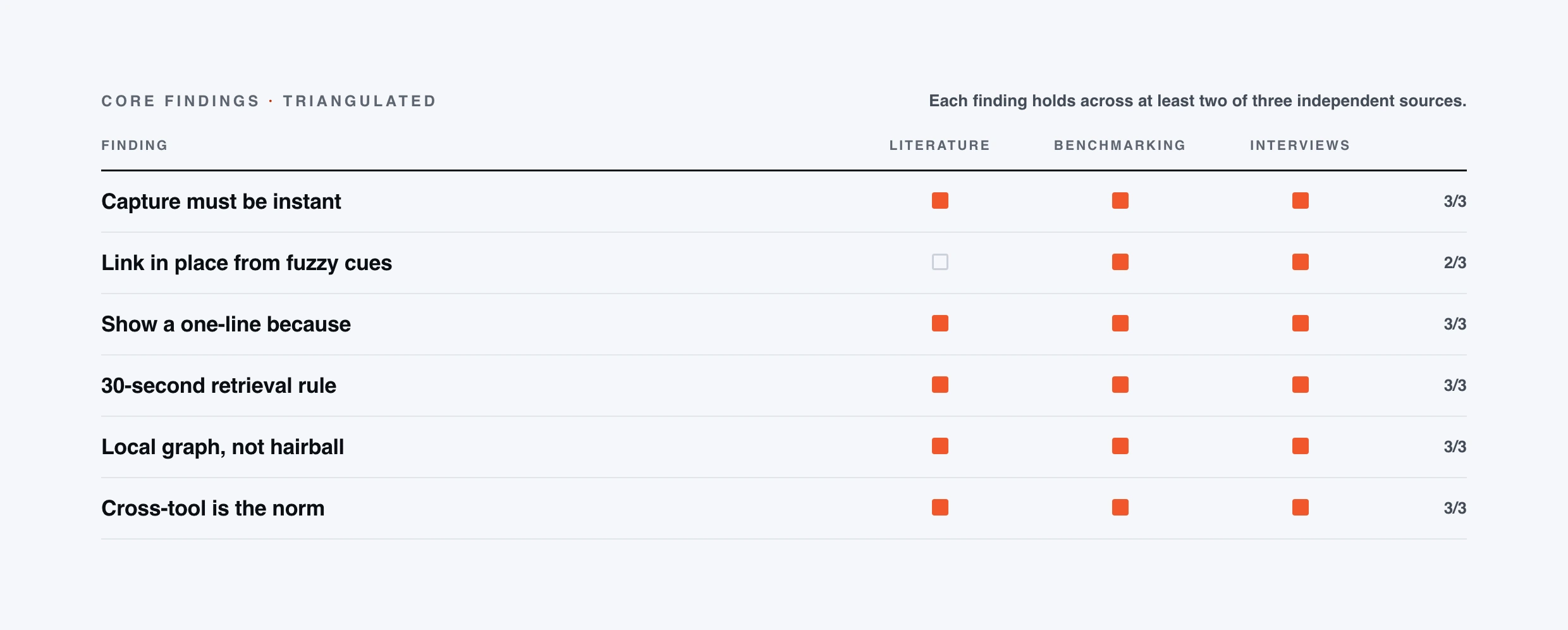
IMAGE UNAVAILABLEEvidence triangulation model requiring two of three sources.
Research record
Evidence triangulation model requiring two of three sources.
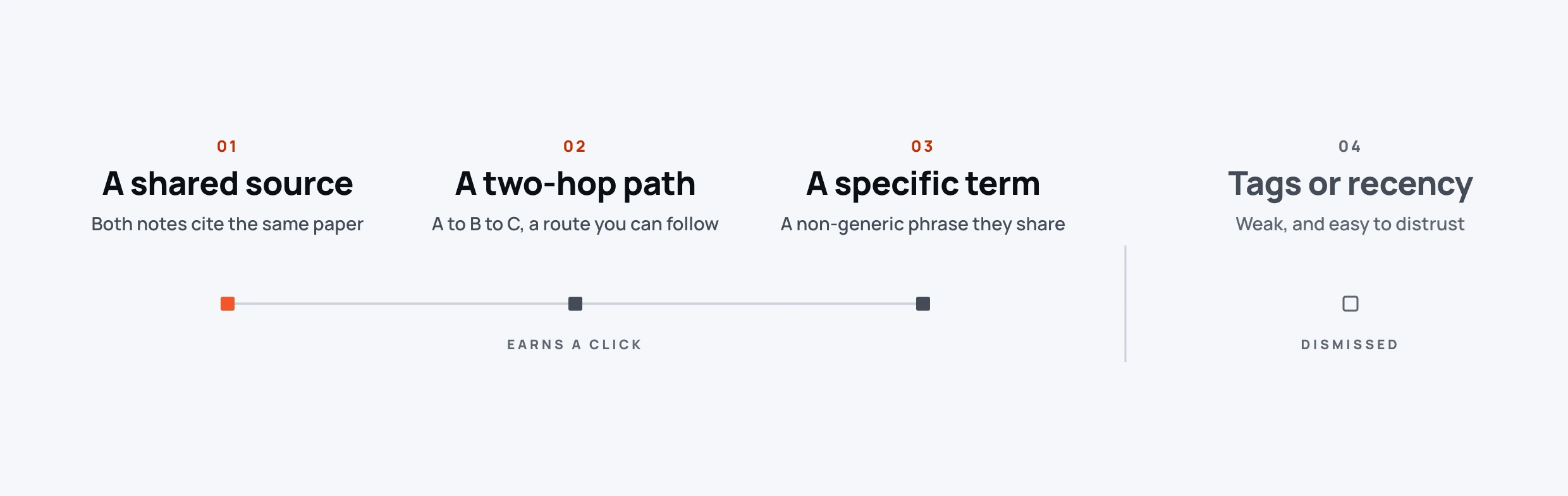
IMAGE UNAVAILABLERanked evidence types behind suggestion trust.
Research record
A shared source ranked first, followed by a short path and a specific term; tags and recency ranked lowest.
A suggestion is only useful when its reason survives
Reasons, source notes, matching tags, focused graph context, and recoverable failure are part of the mechanism.
When does a research finding become a product requirement?
Require support from at least two of three independent sources.
The rule protects the requirements from a single observation or fashionable assumption.
REJECTED PATH Promote every interview quote or benchmark gap directly into scope.
How should an AI suggestion earn trust?
Make the reason a required part of suggestion data, then expose evidence note chips when transparency is enabled.
Making “because” part of every suggestion kept explanation inside the interaction instead of adding it as a label later.
REJECTED PATH Show a confidence percentage or opaque recommendation without a reason.
How should the graph avoid becoming an overwhelming hairball?
Open with onboarding, then let node selection create focus: emphasize the selected neighborhood, dim the rest, and keep Back to notes and Escape available.
The graph was the hardest task in testing; one early failure made a focused view and clear recovery essential.
REJECTED PATH Present the global network without instruction, focus, or a recovery route.
Where should AI live in the workflow?
Keep AI next to the active note and anchor generative actions to a selected note.
Participants understood idea generation only when it was tied to something they had already written.
REJECTED PATH A separate AI destination or blank prompt experience.
The workspace keeps retrieval and explanation beside the note
Each part has a distinct job: the workspace with three panes, fuzzy retrieval, explainable suggestions, and the focused graph.
01 / Workspace loop
Capture stays beside resurfacing
The library, note canvas, and Insights rail keep the four loops in one shell. Cmd+N opens a note with no required fields; typing, slash commands, templates, and Draft with AI are available without setup.
IMAGE UNAVAILABLETho8 workspace with three panes.
Workspace with three panes
Library, note canvas, and Insights rail keep capture and resurfacing in one working context.
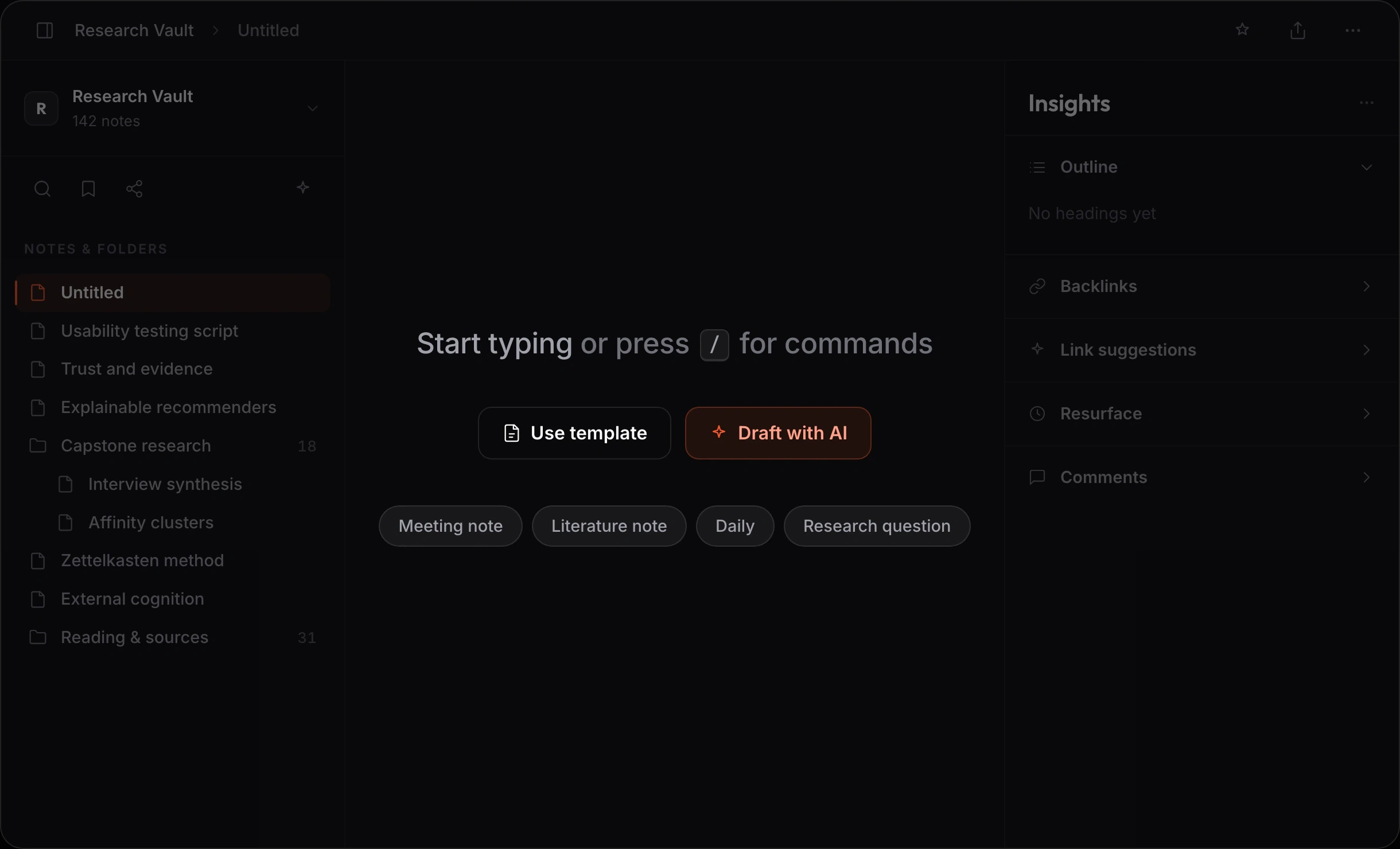
IMAGE UNAVAILABLENote creation surface with minimal friction.
Workspace loop
A new note asks for no metadata before typing; templates, slash commands, and AI remain optional.
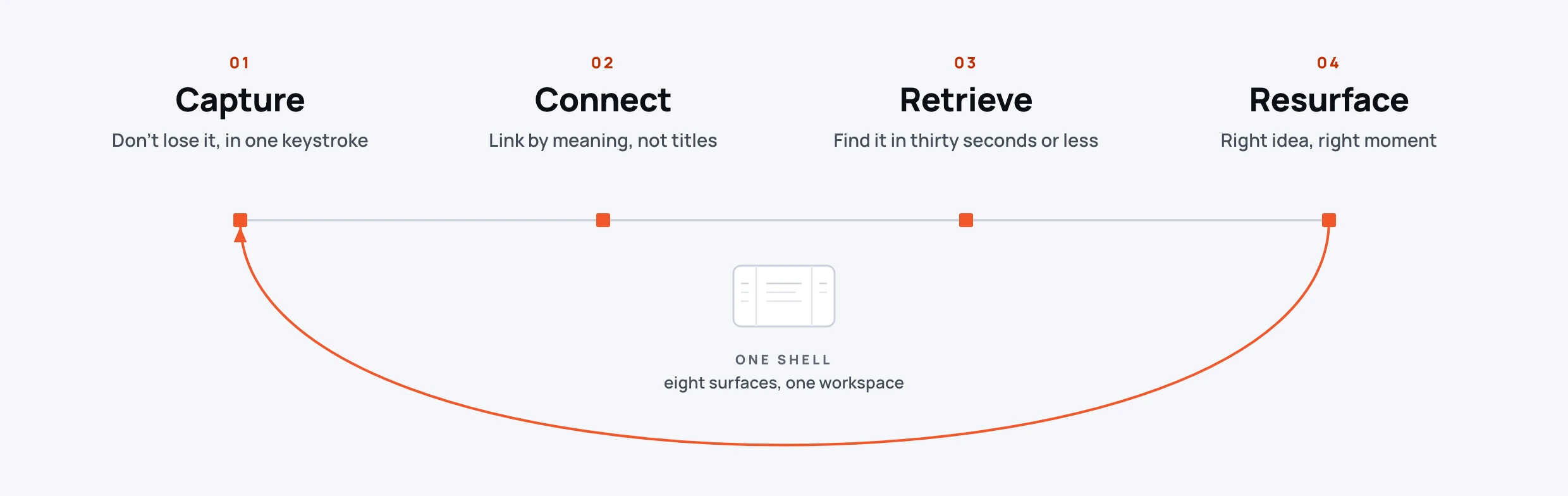
IMAGE UNAVAILABLEFour nested knowledge work loops.
Workspace loop
Four nested knowledge work loops.
02 / Fuzzy retrieval
A dedicated retrieval surface built for keyboard use
Cmd+K gives partial recall a direct path back to a note, searching recent items, actions, and notes with fuzzy matching and keyboard navigation.
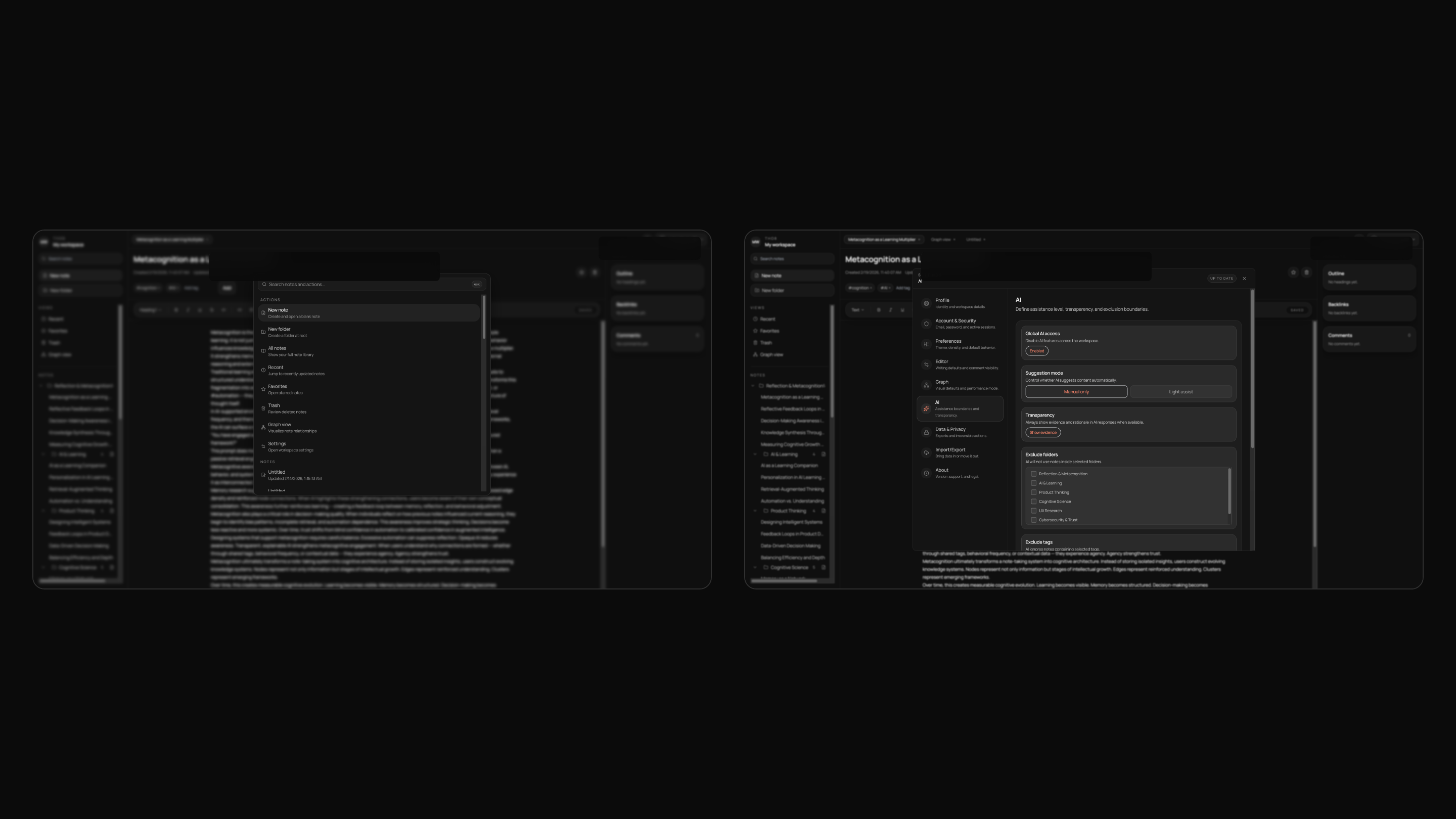
IMAGE UNAVAILABLETho8 retrieval and AI controls view.
Retrieval and AI controls
Retrieval built for keyboard use sits beside explicit assistance level, transparency, and exclusion settings.
03 / Explainable AI
Reason and scope travel with the suggestion
Link suggestions show an inline reason and can reveal evidence note chips. Answers scoped to each note and ideas based on the selected note label the material the AI is working from, keeping its scope visible.
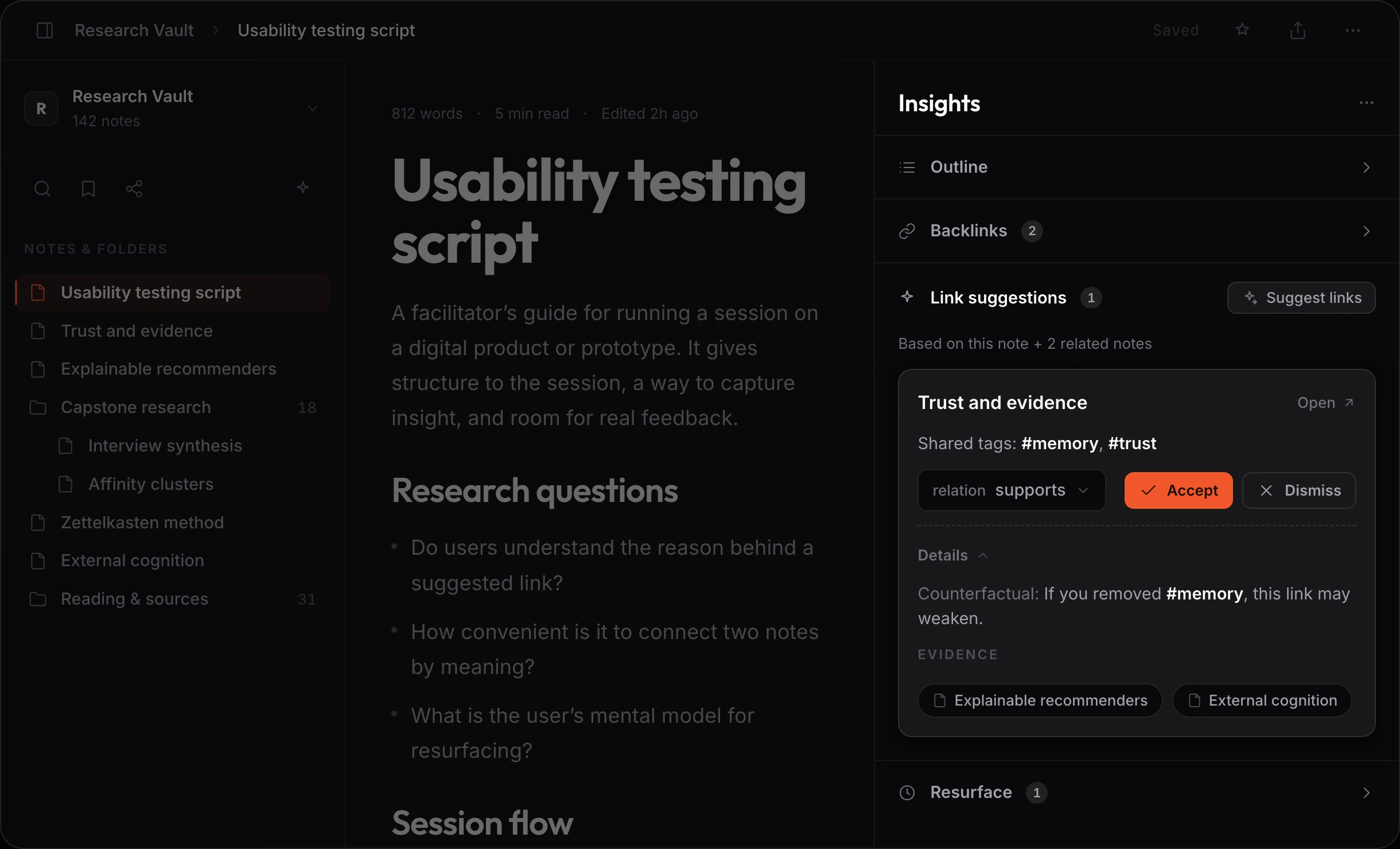
IMAGE UNAVAILABLELink suggestions showing why each match exists.
Explainable AI
A reason stays inline, with controls for relationship, accept or dismiss, details, and optional evidence.
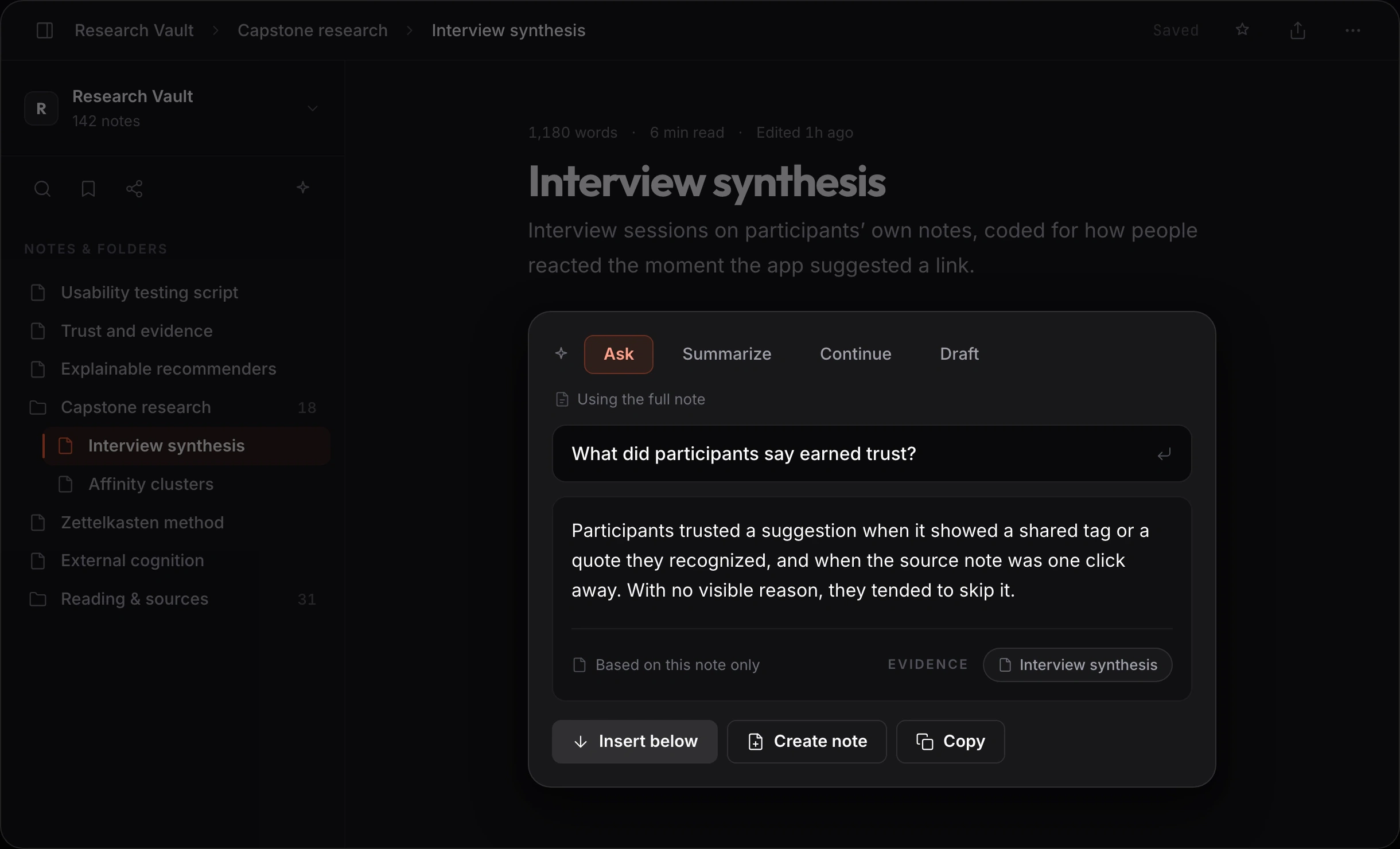
IMAGE UNAVAILABLEAI answer scoped to the current note.
Explainable AI
The answer states its scope as “Based on this note only” before offering actions to insert the answer, create a new note, or copy the answer.
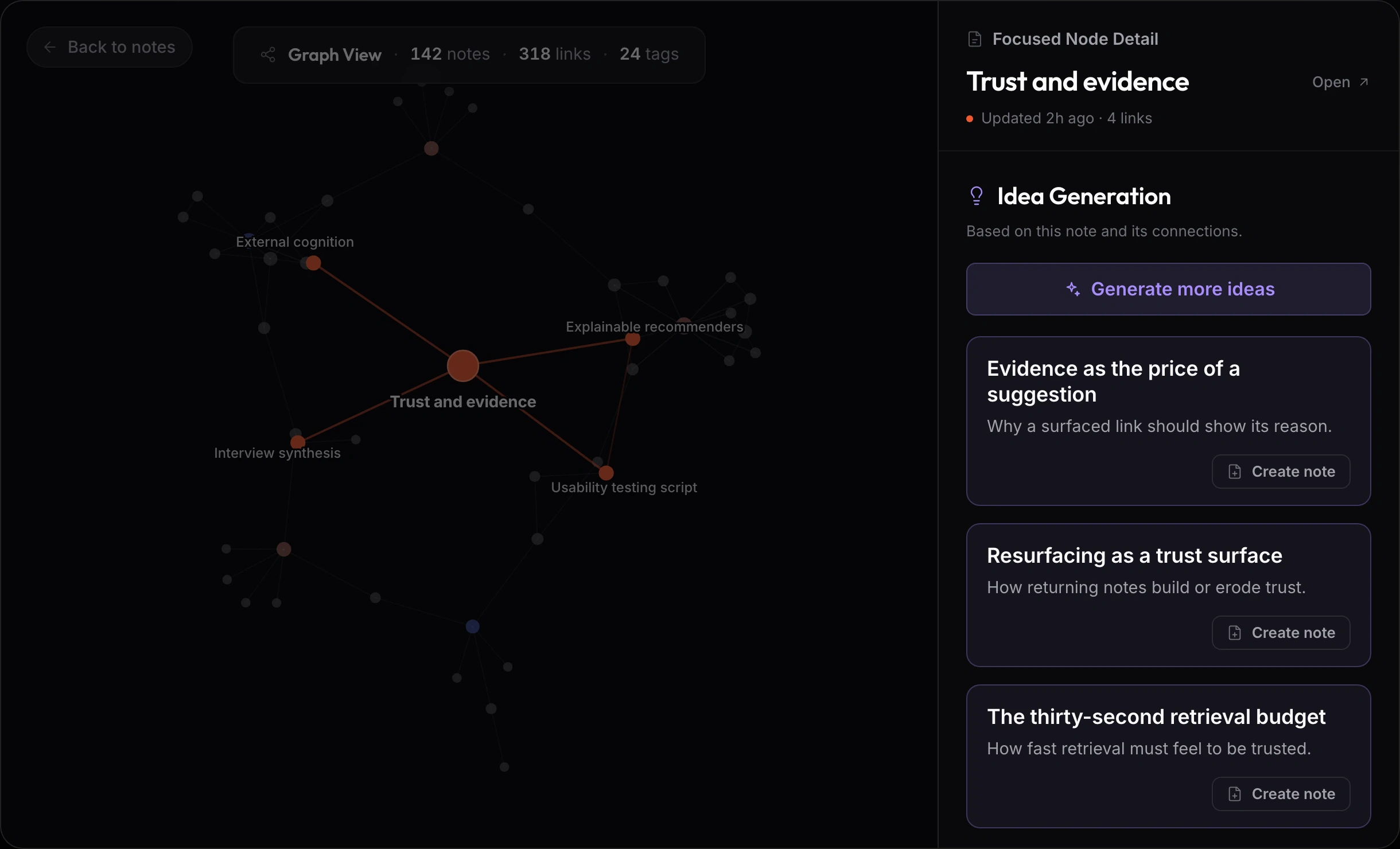
IMAGE UNAVAILABLERelated ideas anchored to a selected note.
Explainable AI
Related ideas anchored to a selected note.
04 / Focused graph
Let selection create the local view
The graph opens with onboarding. Selecting a node emphasizes it and its neighbors while the rest recedes; Back to notes and Escape preserve a clear exit.
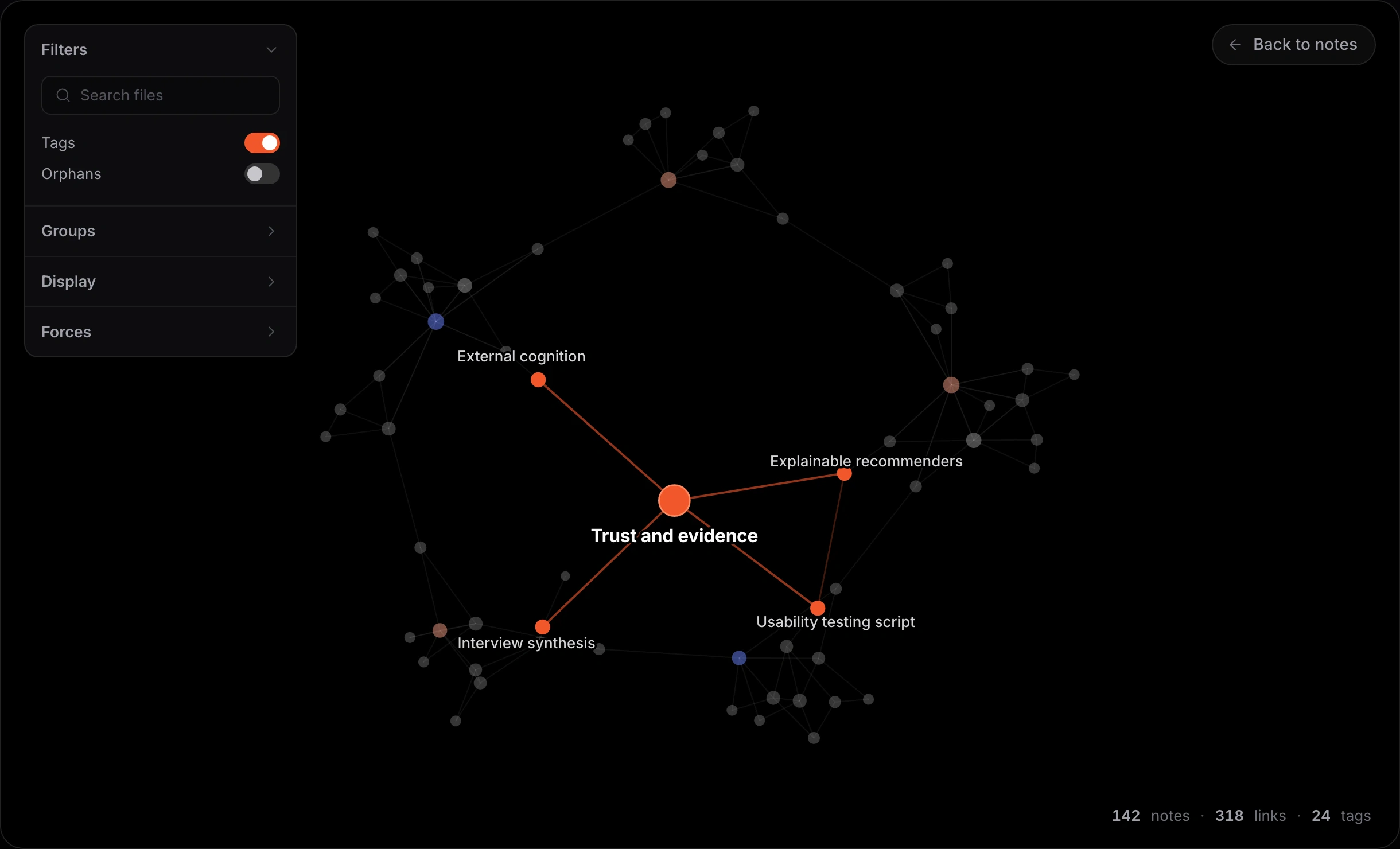
IMAGE UNAVAILABLEGraph view focused on one selected note and its neighbors.
Focused graph
Select a note to emphasize its neighborhood while the rest of the network recedes.
Two rounds changed the interaction model
Round 1 exposed unclear feedback and AI scope. Round 2 tested the revised experience across retrieval, connection, graph focus, and recovery.
Make state and AI scope visible.
WHAT CHANGED The revisions added visible save feedback, clear assistance labels, reasons behind link suggestions, and idea generation anchored to the active note.
PARTICIPANTS 4 to 5 people completed the first moderated round.
Give the graph a point of focus and a way back.
WHAT CHANGED Onboarding, selected node focus, a persistent Back to notes action, and progressive rail disclosure made the network easier to enter and leave.
PARTICIPANTS Six people compared the old and revised interface across four core tasks.
What this case covers
- An HCDE capstone completed across two semesters with Ruhi Vadsariya.
- Six contextual interviews, a benchmark of six tools, and two moderated testing rounds.
- Product design, interaction rules, prototyping, and visual system work led by Neel.
What changed in the practice
Lesson
Trust is a design problem: people need visible reasons, sources, save state, and a place to stand in the graph.
Keep
Triangulate requirements and attach a clear reason to each AI suggestion.
Change
Introduce graph focus and recovery before adding more network complexity.
Carried forward
Turn specific confusion into reusable state and interaction rules.